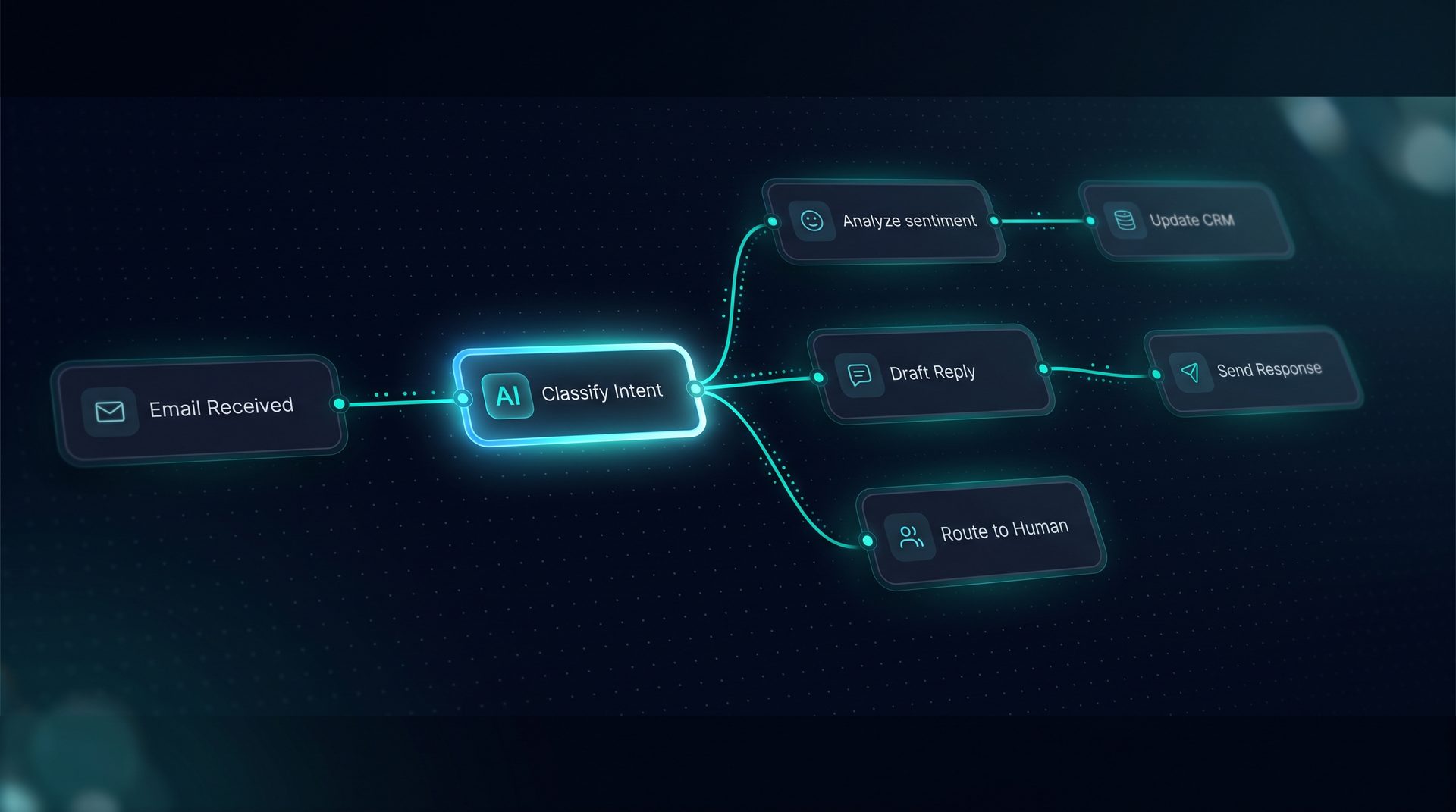
Ai agent example patterns your team can actually build
What an ai agent example is and why it matters
An ai agent example shows a concrete workflow that teams can replicate to automate repeatable processes like support triage, lead qualification, document processing, and research routing. These examples make abstract AI concepts actionable: they name the inputs, the model behavior, the tools called, and the human review points. For business teams evaluating ai use cases, examples reduce the guesswork and shorten time-to-value.
Expert tip: start with one simple ai agent example aligned to a single high-volume task — this makes testing and measurement straightforward.
Core patterns in ai agent example galleries
Each ai agent example typically maps to a pattern you’ll see across industries. Below are the most useful patterns and when to use them:
- Support routing: classify inbound messages, attach relevant knowledge, and dispatch to the right team.
- Lead qualification: ask qualification questions, score leads, and push to CRM or human sales.
- Invoice processing: parse invoices, extract fields, and route for approval.
- Research assistant: retrieve documents, summarize findings, and produce citations.
These patterns demonstrate common ai use cases and show how to combine agent models, retrieval, and tools into a reliable workflow.
How ai agent example patterns work — step by step
- Define the trigger: inbound email, web widget, or API
POST /run. - Preprocess and validate input: apply typed edges and schema validation in the canvas.
- Classify intent: a small classification model or rule node determines the path.
- Retrieve knowledge: use the RAG stack to fetch chunks from indexed documents.
- Model call and tool use: the agent calls a model with a compiled prompt and any registered tools.
- Human-in-the-loop: pause nodes route to a reviewer if confidence is low.
- Deploy and observe: publish to a web widget, email channel, or API and monitor traces.
This sequence shows how use cases for ai move from trigger to outcome while keeping governance and observability in place.
Who should use these ai agent example patterns
- Customer support managers who need predictable triage.
- Revenue ops and SDR leaders running lead qualification flows.
- Finance teams automating invoice ingestion and approval.
- Research teams building assistants that fetch and summarize internal knowledge.
Non-technical business users can visually wire agents on a canvas without writing framework code. Engineers can extend the same flow with custom tools or REST integrations when necessary.
Choosing the right agent model and tools
When you build an agent, pick an agent models configuration that matches task complexity. Lightweight classifiers are good for routing; larger conversational models are appropriate where summarization and multi-step reasoning are required. Tools you might include in an ai agent example:
- REST/GraphQL connectors to CRM or ticketing systems.
- File ingestion for PDFs, CSVs, and HTML.
- Built-in utilities like JMESPath projection and SSRF guard.
DeepForce’s visual Tool Builder supports REST, GraphQL, SQL, and code tools, letting you test live and trim payloads with JMESPath before a model call.
Example: build an ai lead-qualification agent in one session
- Start a new canvas and drag an inbound email trigger.
- Add a classifier node to detect product interest and urgency.
- Attach a small Q&A set to intercept frequent questions.
- Add a model node that runs a short qualification prompt.
- Call a CRM
toolto create a lead when pass criteria are met. - Add a pause node for human review on low-confidence leads.
- Publish to an email channel or
Run APIfor consumption.
This ai agent example maps clearly to a business outcome: faster lead handling, fewer false positives, and audit trails for every run.
Governance, observability, and maintenance
Good examples include governance: PII redaction, blocked terms, and network allow/deny lists. Observability shows token usage, latency, and nested span trees so you can debug and measure costs per step. Keeping agent components modular — tools, knowledge, and prompts — makes it easier to update a single piece without rebuilding the whole workflow.
When to pick an ai agent example vs build an ai from scratch
- Choose an ai agent example when you need a repeatable pattern and a working baseline you can adapt.
- Choose to build an ai from scratch when you have highly specialized models or deep engineering resources.
Examples accelerate adoption: they demonstrate the right mix of agent models, retrieval, and human-in-the-loop design so teams can iterate quickly.
Final practical checklist before you publish
- Validate triggers and typed edges.
- Confirm tool credentials and environment variable resolution per environment.
- Add Q&A pairs for high-frequency queries.
- Turn on PII redaction and set budget caps.
These steps make any ai agent example safe to ship and easier to maintain.
How DeepForce fits these patterns (natural example)
DeepForce exposes the full agent-building process through a drag-and-drop canvas where non-developers can assemble agents, tools, knowledge, and human review steps. The platform uses LangChain and LangGraph under the hood and supports publishing to web widgets, email channels, a Run API, or an MCP server. Use DeepForce to try an ai agent example quickly and iterate with live observability and version history.
Summary
An ai agent example turns abstract ai use cases into actionable workflows you can test, measure, and publish. Whether your goal is support, triage, invoice processing, or research, starting from a clear example shortens time-to-value and helps you scale automation across teams.