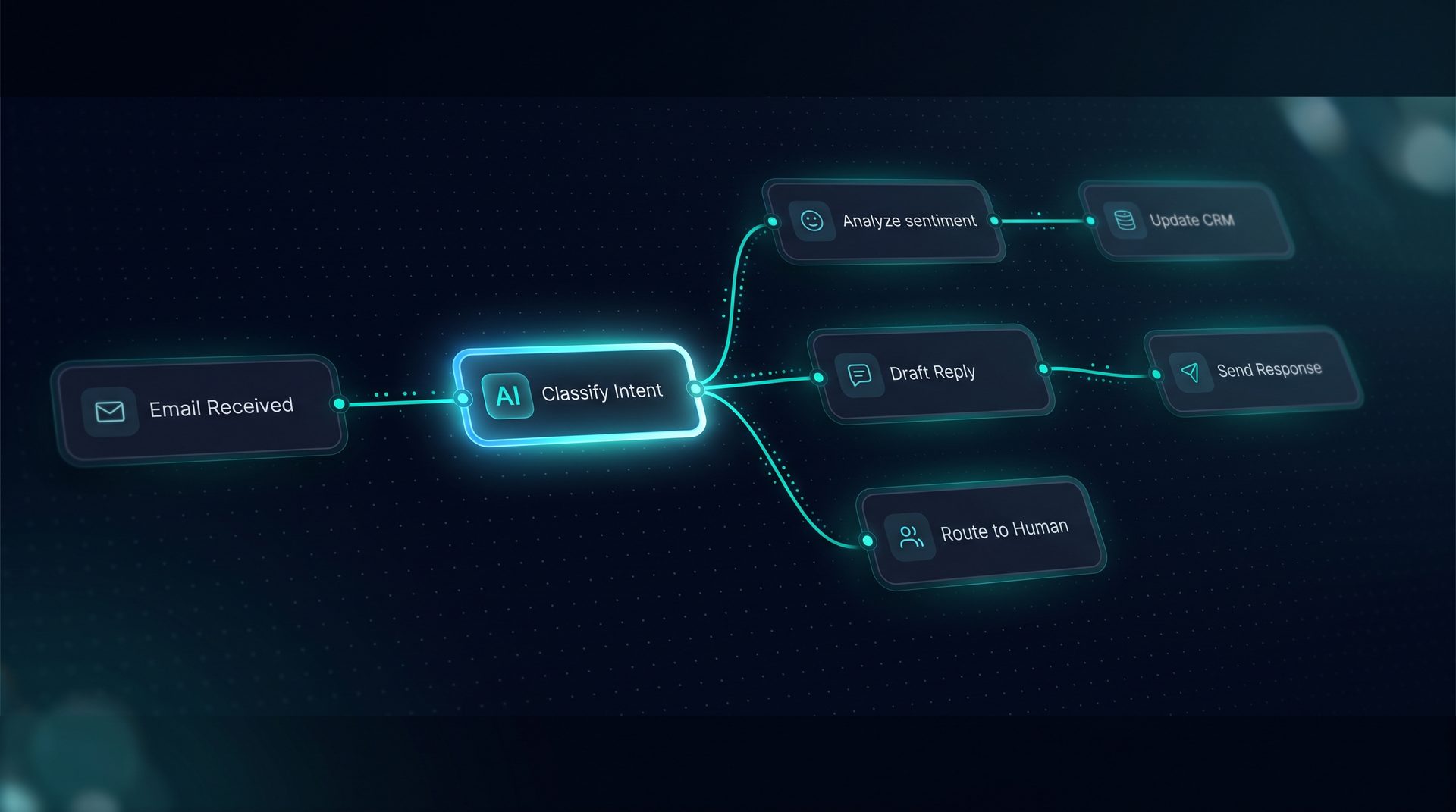
What an ai agent platform is and why it matters
An ai agent platform is a system that lets teams build intelligent, repeatable processes that act on behalf of users. These are not simple chatbots: they are agents that combine models, tools, knowledge, and human review to complete tasks like routing approvals, answering customer questions, or syncing data between systems. Modern businesses choose an ai agent platform to reduce manual work, improve response times, and keep control of data and integrations.
Why this matters: teams often delay automation because developer-facing frameworks or enterprise pricing block progress. A visual agent platform empowers product managers, support leads, and operations teams to ship reliable automation without writing framework code.
Key capabilities an organization should expect
- Visual builder: drag-and-drop canvas to assemble models, tools, and workflows.
- Tool integrations: register REST, GraphQL, SQL, and built-in tool types to talk to your stack.
- Knowledge and RAG: ingest documents, URLs, and files to ground agent responses.
- Deployment channels: publish agents to web widgets, email, an API endpoint, and MCP servers.
- Observability: token, latency, and cost breakdown per run.
These capabilities make an agent platform useful beyond proof-of-concept: they enable production-grade agent systems that scale.
How an ai agent platform works — step by step
- Define an objective: decide what process you want to automate (support triage, approval routing, data sync).
- Build visually: create an agent by wiring a model, system prompt, tools, retrieval, and Q&A pairs on a canvas.
- Test in the Playground: run conversations, watch nodes light up, inspect state schema and the compiled prompt.
- Add guardrails: apply PII redaction, blocklists, budget caps, and scoped API keys for governance.
- Deploy across channels: publish the agent to a web widget, send to an email inbox, expose a Run API, or publish via an MCP server.
- Observe and iterate: review run traces, token breakdowns, and debug retrieval to improve accuracy.
Expert tip: use Q&A pairs to intercept frequent questions before retrieval to reduce hallucination and surface the right content faster.
Who should use an ai agent platform
- Product teams that need a non-developer way to prototype and ship automation.
- Support and ops teams that want predictable routing, handoffs, and approvals.
- Data and engineering leads who need self-hosted infrastructure and compliance controls.
An agent platform reduces reliance on engineering by letting stakeholders iterate on prompts, tools, and workflows directly.
When to choose a visual agent platform over building from libraries
Choose a visual agent platform when you need to move from prototype to production quickly and want to maintain visibility into runs, governance, and integrations. If your team needs a multi agent platform that publishes to many channels, a visual approach shortens the delivery loop.
If you require a developer-first approach for custom model stacks, a library like LangChain might still be appropriate; however, many teams find that a purpose-built agent software with a canvas and deployment channels accelerates adoption.
How deployment channels change outcomes
- Web widget: embed with one line and keep operational details private while capturing user interactions.
- Email channel: deploy workflows that respond to inbound emails and route to human inboxes when needed.
- Run API: integrate agents into backend systems with POST /run for streaming and human-in-the-loop resumes.
- MCP server: expose workflows and tools over an HTTP/SSE interface so clients like Claude Desktop and VS Code can connect.
A multi agent platform that supports all these channels lets you reuse a single workflow across multiple customer touchpoints without rewriting logic.
The role of tools, knowledge, and guardrails in a production agent
- Tools: register REST, GraphQL, SQL, and built-in tools. Configure retries, rate limits, SSRF guards, and caching per tool.
- Knowledge: ingest text, files, and crawled sites into a vector store, add Q&A pairs for common questions, and use a search debugger to inspect retrieval relevance.
- Guardrails: apply project-level PII redaction, blocked-term lists, and network allow/deny rules. Implement budget and quota caps and scoped API keys.
These elements make an agent system suitable for enterprise use while keeping data on infrastructure you control.
Agent systems in practice — a natural example
Imagine a support automation that triages inbound email, consults a knowledge base, and either replies or pauses for a human. On a canvas you wire an email trigger to an agent that uses retrieval from a document vector store, calls an internal REST tool to fetch ticket metadata, and applies a classifier node to route to the correct queue. Publish that workflow to the email channel, and the same agent can be embedded in your product via the web widget or called from your backend through the Run API.
This demonstrates how an agent platform, agent software, and multi agent platform concepts combine into a unified operational system.
How to evaluate agent platform vendors
- Deployment breadth: does the platform support web widget, email, Run API, and MCP server?
- Governance: are PII redaction, scoped API keys, and audit logs available?
- Observability: can you see token, latency, and cost per step?
- Tooling: does the system let you register REST/GraphQL/SQL tools and configure retries and caching?
- Data control: is the platform self-hostable and does it keep data on your infrastructure?
Choosing a vendor that matches these criteria reduces risk and shortens time to production for agent systems.
Conclusion
Selecting the right ai agent platform determines how fast teams move from concept to shipping automation across channels. Look for a platform that unifies visual agent building, tool and knowledge integrations, robust guardrails, and multi-surface deployment so the same workflow can serve customers wherever they interact with your product. Position the agent platform as an operational layer that reduces manual work and keeps teams in control while enabling scale.