logo
DeepForce

Ai for enterprises with governed workflows, RBAC, audit logs, and project-level guardrails.

Self-hosted agent builder that enforces RBAC, PII redaction, and audit trails for security and compliance across teams.

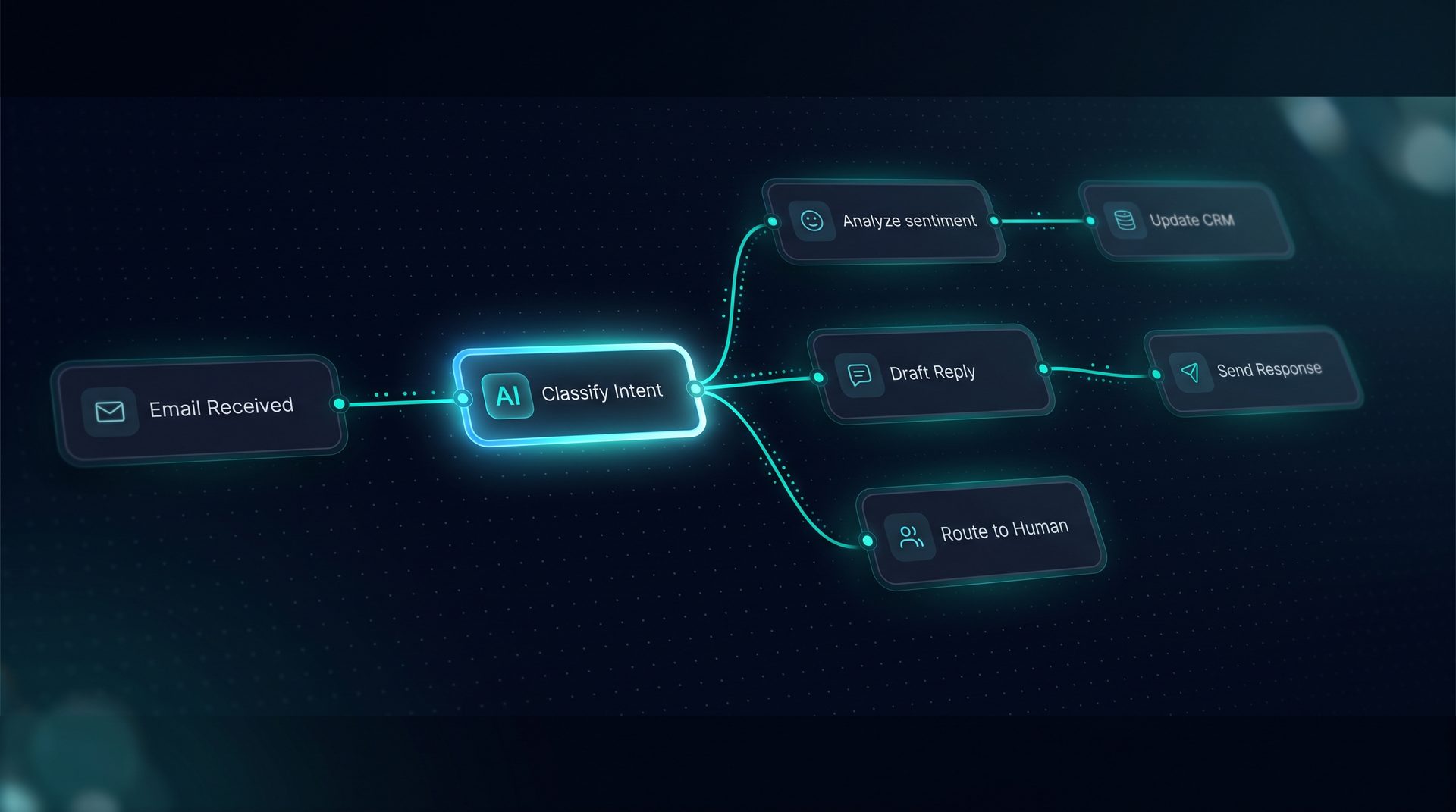
DeepForce visual canvas wiring agents, tools, and knowledge into a live workflow

Ai for enterprises

This is an ai-generated page and could contain misleading information.Please verify any information first before take any action.

Ai for enterprises is about building and running AI systems inside a controlled environment that meets compliance, security, and governance needs. This page explains what enterprise teams must consider, why governance and observability matter, and how an agent platform can deliver repeatable business workflows without developer-first complexity.

What ai for enterprises means

Enterprises need AI that respects data residency, access controls, and audit requirements. For many organizations, adopting AI without project-level guardrails or role-based access control introduces unacceptable risk. Ai for enterprises prioritizes:

  • Strong RBAC and scoped API keys
  • Project-level PII redaction and blocked terms
  • Audit logs and version history for compliance
  • Deployment models that keep sensitive workloads on your infrastructure

These elements reduce risk while enabling teams to automate approvals, customer support, and data routing.

Why governance and observability matter for ai for enterprises

Governance prevents leaks and enforces policies across models, tools, and workflows. Observability gives you the data to answer: who invoked a workflow, what data was sent, which subagent made the call, and the token and latency costs per step. Without this, teams either block AI projects or accept unknown risk.

Expert tip: Look for platforms that separate local development data stores from production storage so secrets and PII remain controlled.

How an agent platform supports enterprise adoption

An enterprise agent platform offers visual building blocks so non-developers can compose agents, tools, and workflows while maintainers enforce policy. Typical capabilities include:

  1. Visual agent and workflow builders that expose prompt composition, tools, and retrieval nodes.
  2. Tool registration and testing for REST, GraphQL, SQL, and custom code endpoints.
  3. Knowledge ingestion, chunking, and vector storage with a retriever debugger to inspect returned evidence.
  4. Human-in-the-loop nodes for approval and live handoff.

These capabilities let product, support, and operations teams automate repeatable processes without writing framework code.

How it works step-by-step

  1. Define a project and grant scoped roles using RBAC so only approved teams can publish agents.
  2. Ingest knowledge sources — files, URLs, or crawls — and configure chunking and embeddings.
  3. Build a Deep Agent on the canvas by wiring models, tools, Q&A intercepts, and middleware. Use the live compiled prompt preview to validate behavior.
  4. Register tools (REST, GraphQL, SQL) and group them into publishable toolsets that are grantable per project.
  5. Add guardrails: blocked terms, PII redaction, network allow/deny lists, and budget caps before publishing.
  6. Deploy to a selected channel (web widget, email, Run API, or MCP server) on infrastructure you control.

This process ensures audits are simple and every run produces spans that show tokens, latency, and cost per step.

Who should use ai for enterprises

  • Security and compliance teams that require project-level governance and audit trails.
  • Product managers and ops teams who want to ship customer-facing automations without developer bottlenecks.
  • Engineering teams that need a self-hosted agent platform compatible with LangChain and LangGraph.

Ai for enterprises also fits ai for startups that plan to scale securely and ai for companies evaluating governance-first platforms.

When to choose a self-hosted approach

Choose self-hosted when your organization requires data residency, strict network controls, or vendor isolation. A self-hosted agent platform is appropriate when:

  • You must keep secrets and PII on your infrastructure.
  • You need per-project RBAC, scoped API keys, and restricted tool endpoints.
  • You require an audit log and exportable run traces for compliance reviews.

If your priority is rapid prototyping without governance, other hosted solutions may be faster, but they may not meet enterprise constraints.

Example: deploying governed workflows (product reference)

Consider a support automation that routes requests, retrieves knowledge, and escalates to a human for approvals. Using an agent platform you can:

  • Build a Deep Agent that calls a retrieval node, classifies intent, and invokes a ticketing tool.
  • Register the ticketing API as a tool with SSRF guard and retry policies.
  • Add a pause node for manager approval and live handoff to an inbox.
  • Enable project-level PII redaction and blocked terms to ensure compliance.

This concrete example shows how an agent platform reduces developer overhead while preserving governance.

Key capabilities to verify when evaluating vendors

  • Visual Agent Builder with prompt preview and subagent wiring
  • Visual Workflow Builder with loops, routers, and parallel fan-out/join
  • Tool Builder supporting REST, GraphQL, SQL, and built-ins
  • Knowledge and RAG with chunking, embedding, and a search debugger
  • Human-in-the-loop, observability with span trees, and audit logs
  • Guardrails: PII redaction, blocked terms, network allow/deny, budget caps

Closing thoughts

Ai for enterprises requires a balance of usability and governance. An agent platform that offers drag-and-drop building, tool registration, and robust guardrails enables business teams to automate without elevating risk. When evaluating solutions, prioritize those built on open ecosystems like LangChain and LangGraph and that let you host infrastructure and data on your terms. DeepForce illustrates how an enterprise-focused platform can deliver secure, observable, and governed automation for ai companies, ai for companies, and ai for startups seeking control and compliance.


The canvas behind every agent you ship.

Wire it once. Deploy it everywhere.
Introducing DeepForce

Wire it once. Deploy it everywhere.

DeepForce is a visual AI agent builder and automation platform. Compose agents, tools, knowledge, and logic on a drag-and-drop canvas — then publish to an API, MCP server, email inbox, or embeddable web widget without writing framework code. Built on MIT-licensed LangChain and LangGraph, self-hosted on infrastructure you control.

  • Visual drag-and-drop agent and workflow builder
  • Span-level observability with tokens, latency, and cost
  • Deploy to web widget, email, run API, or MCP server
30+
Workflow node types
4
Deployment channels
6
Knowledge file formats
Core capabilities

Everything you need to run autonomous ops.

AI agents that act

AI agents that act

Agents execute multi-step workflows without hand-holding.

Real-time reasoning

Real-time reasoning

See exactly how the AI thinks and decides

Human-in-the-loop

Human-in-the-loop

Approve, override, or audit any decision before it ships.

Other features:
Visual workflow canvas
API integrations
Document ingestion
Audit trail
Role-based access

Common Enterprise Questions

DeepForce applies project-level PII redaction by scanning inputs and outputs against configured redaction rules before storage or retrieval. Redaction runs as part of the workflow pipeline so sensitive snippets are removed or masked prior to being saved to vectors or logs. The platform surfaces a redaction audit in the run trace so reviewers can confirm which fields were altered. Administrators set redaction patterns and exceptions per project, ensuring governance teams retain control while teams continue to run agent workflows on internal infrastructure.
Role-based access control in DeepForce assigns scoped permissions at the project level, including publish, edit, and tool-grant rights. Administrators create per-project API keys restricted to specific roles and capabilities. RBAC integrates with the UI so only authorized users can edit agents, register tools, or change guardrails. This separation reduces blast radius and aligns with enterprise segregation of duties, allowing security and compliance teams to enforce policy while product teams iterate inside permitted boundaries.
Yes. DeepForce is designed for self-hosted deployments and supports local data options like SQLite and embedded Chroma for testing, plus Postgres + pgvector and Redis for production. The platform runs on infrastructure you control, keeping secrets and production data inside your network. Environment variables and endpoints resolve differently per environment to support staging and production. This model meets enterprise requirements for data residency and network isolation while enabling full agent-building capabilities.
DeepForce produces a collapsible span tree for every run showing latency, tokens, and cost per step. Subagent dispatches appear as named spans, and the Playground streams a live activity timeline. Exports to OpenTelemetry collectors and Langfuse are supported for centralized tracing and cost analysis. These traces help teams audit behavior, optimize token usage, and explain decisions during compliance reviews, giving security and product teams the context needed to validate automated workflows.
The Tool Builder lets admins register REST, GraphQL, SQL, and code-based tools, test them live, and configure retries, rate limits, and caching per tool. Built-in tools are auto-provisioned and undeletable, and tools can be grouped into named sets that are grantable in one click. JMESPath projections can trim payloads before the model receives them, and SSRF guards protect outbound calls. This ensures enterprise teams can expose only approved integrations to agents.
DeepForce enforces blocked terms and network allow/deny lists at the project level so administrators can prevent sensitive queries and restrict outbound endpoints. These guardrails apply across agents and workflows and cannot be loosened by regular users. Combined with budget caps and audit logs, these controls help compliance teams limit exposure and maintain predictable operational costs while allowing business teams to automate safely.
Human-in-the-loop nodes pause workflow execution and route a session to a human inbox for review. The human reply returns over the same channel and the workflow resumes from the pause node. Live handoff preserves context, including retrieved knowledge and tool outputs, and is visible in the run trace. This design lets teams insert approvals or corrections at critical steps without losing auditability or breaking the end-to-end automation.
DeepForce accepts pasted text, URLs, crawled sites, and files such as txt, md, pdf, html, csv, and json. Content is chunked and embedded for vector storage, and a search debugger plots similarity so you can inspect which chunks the retriever returns. Q&A pairs can intercept frequent questions before retrieval. This flexible ingestion makes it straightforward to build robust retrieval-augmented generation pipelines for enterprise use cases.

Your Competition Is
Already Using AI.

Every day you wait is another day paying employees to do what AI does better, faster, and cheaper.