logo
DeepForce

Ai process automation that pauses for human review while keeping audit logs and triggers

Run visual workflows with triggers, pause nodes for approvals, and audit logs — for ops teams automating approvals, routing, and support.

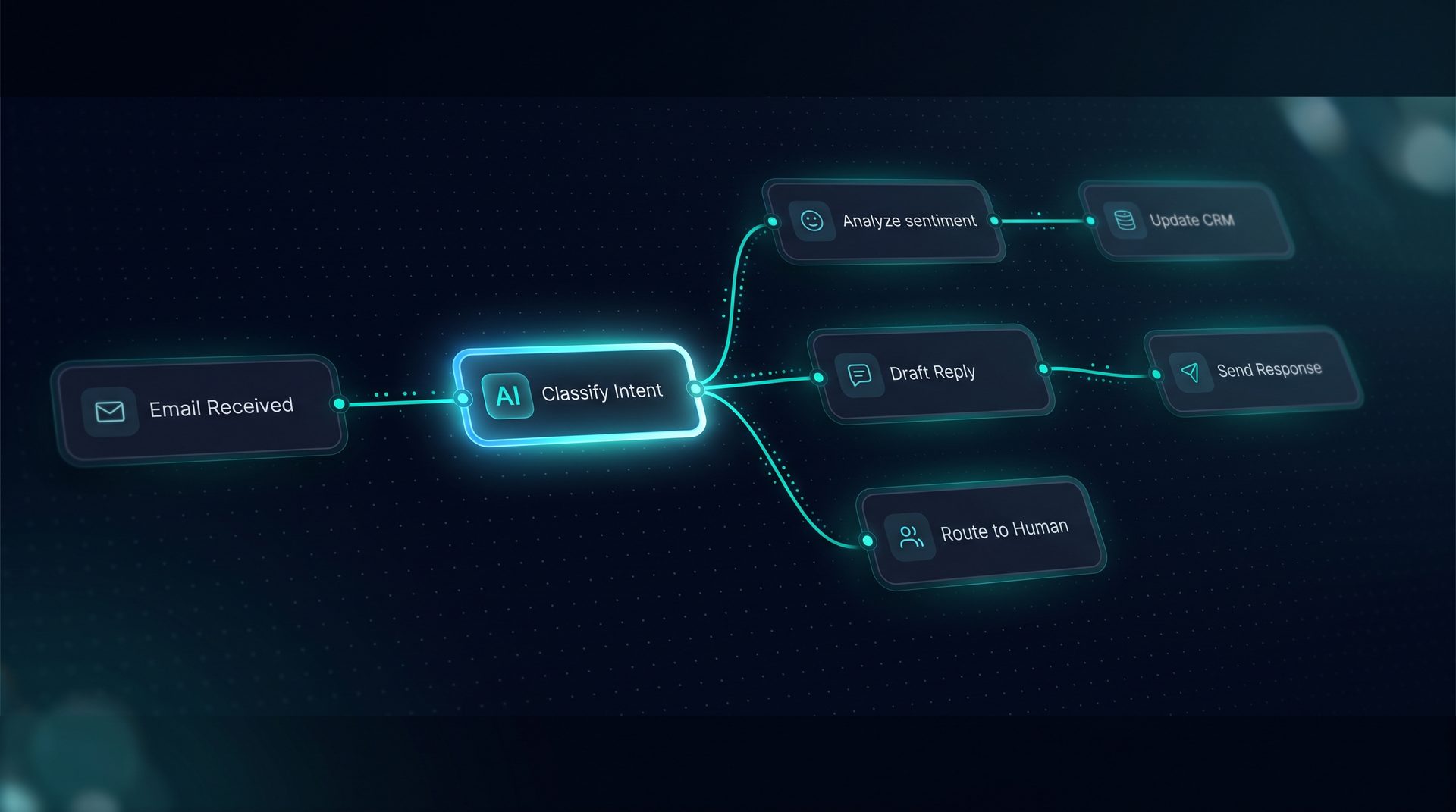
DeepForce visual canvas wiring agents, tools, and knowledge into a live workflow

Ai process automation

This is an ai-generated page and could contain misleading information.Please verify any information first before take any action.

Ai process automation transforms repetitive business workflows into reliable, testable flows that include human review when necessary. This guide explains what ai process automation is, why it matters for approvals, routing, and support, how it works step-by-step, who should adopt it, and when to use it — with DeepForce shown as a practical example that fits the described patterns.

What ai process automation is

Ai process automation uses models, logic, and integrations to run parts of a business process without hand-coding an orchestration layer. It combines decisioning, retrieval, tool calls, and human-in-the-loop steps to complete tasks such as routing requests, approving expenses, or responding to common support questions. Organizations looking for ai for process automation want both autonomy and control: the ability to automate repeatable tasks while pausing for human review where policy or risk requires.

Why ai process automation matters

  • Reduce manual handoffs for common requests
  • Speed approvals with model-assisted recommendations
  • Keep audit trails for compliance and observability

Automation and ai together let teams scale repeatable workflows without adding headcount. When you adopt ai in automation thoughtfully, you gain faster turnaround, clearer accountability, and measurable cost visibility across each run.

Expert tip: Start with high-volume, low-risk workflows such as FAQ routing or invoice triage. These show ROI and let you tune retrieval and classifiers before moving to heavier approvals.

How ai process automation works — step by step

  1. Trigger: A webhook, schedule, or inbound email starts the workflow.
  2. Ingest: The workflow ingests text, file attachments, or structured payloads and normalizes fields.
  3. Classify & Route: A classifier node sorts the request into lanes (support, billing, approvals) using models and rule-based checks.
  4. Retrieve Context: A retrieval step pulls related knowledge, Q&A, or document chunks to ground responses.
  5. Generate Recommendation: A model produces an answer, recommendation, or pre-filled response for a human reviewer.
  6. Human-in-the-Loop: A pause node halts flow for approval; the reviewer replies inline and the session resumes.
  7. Execute Tools: Approved actions call APIs, update databases, or send outbound emails.
  8. Observe & Audit: Each run emits spans for latency, tokens, and per-step cost; the audit log stores who approved what and when.

This flow shows how ai workflow design balances autonomy with control, letting teams use ai in automation while preserving governance.

Core building blocks to include

  • Triggers: webhooks, scheduled jobs, or inbound email.
  • Classifiers and routers: route requests to specialist lanes.
  • Retrieval & RAG: serve up context from documents, crawled sites, or Q&A pairs.
  • Pause nodes: human-in-the-loop steps for approvals and policy checks.
  • Tool calls: REST, GraphQL, SQL, or custom integrations for execution.
  • Observability: per-node latency, token usage, and audit logs for compliance.

Who benefits from ai process automation

  • Ops teams that manage approvals and need structured handoffs
  • Support teams aiming to reduce first-response times and improve routing
  • Finance and compliance teams that require audit trails for decisions
  • Product and platform teams building embeddable experiences with a web widget or API

If your team faces repeated daily processes that require occasional human judgement, ai process automation is a fit.

When to deploy ai process automation

Use ai process automation when tasks are repeatable, have predictable triggers, and require occasional human oversight. Good use cases include:

  • Approvals for expense reports or contract signoffs
  • Routing inbound customer requests to the right team
  • Automating first-pass support replies and escalating when necessary

Avoid automating flows that require continuous manual judgment without a clear approval point.

Implementation considerations

  • Data governance: Apply PII redaction and blocked terms at the project level to protect sensitive data.
  • Tool security: Use environment variables per environment and an SSRF guard for outbound calls.
  • Observability: Instrument runs with token and latency tracing; export to OpenTelemetry if required.
  • Testing: Build workflows on a visual canvas and use a Playground that streams runs for debugging.

Example: How DeepForce maps to this pattern

DeepForce is a self-hosted platform that exposes a drag-and-drop canvas to visually build agents and workflows. It supports triggers (webhooks, schedules, inbound email), pause nodes for human approvals, and an audit log per project. Its knowledge ingestion supports files, crawled sites, and Q&A pairs for retrieval-augmented generation. Tool integrations include REST, GraphQL, SQL, and built-in tools with JMESPath projection to shape payloads before model calls.

As a practical example, an approvals workflow can start on inbound email, classify the request, retrieve policy documents, present a generated recommendation to a reviewer via a pause node, then execute a database update after approval — all while producing an exportable audit trail.

Next steps to get started

  • Map one repeatable process that needs approvals or routing.
  • Define triggers, classification rules, and approval thresholds.
  • Build a first workflow on a visual canvas and test in a Playground.
  • Add observability and PII redaction before publishing to production.

By combining automation and ai with clear pause points and governance, teams can scale repeatable processes while keeping humans in control. Use ai process automation to remove repetitive work, speed decisions, and keep an auditable record of every handoff.


The canvas behind every agent you ship.

Wire it once. Deploy it everywhere.
Introducing DeepForce

Wire it once. Deploy it everywhere.

DeepForce is a visual AI agent builder and automation platform. Compose agents, tools, knowledge, and logic on a drag-and-drop canvas — then publish to an API, MCP server, email inbox, or embeddable web widget without writing framework code. Built on MIT-licensed LangChain and LangGraph, self-hosted on infrastructure you control.

  • Visual drag-and-drop agent and workflow builder
  • Span-level observability with tokens, latency, and cost
  • Deploy to web widget, email, run API, or MCP server
30+
Workflow node types
4
Deployment channels
6
Knowledge file formats
Core capabilities

Everything you need to run autonomous ops.

AI agents that act

AI agents that act

Agents execute multi-step workflows without hand-holding.

Real-time reasoning

Real-time reasoning

See exactly how the AI thinks and decides

Human-in-the-loop

Human-in-the-loop

Approve, override, or audit any decision before it ships.

Other features:
Visual workflow canvas
API integrations
Document ingestion
Audit trail
Role-based access

Common ai questions

Ai process automation handles approvals and routing by combining automated classification with explicit human-in-the-loop pause nodes. The workflow starts from a trigger such as a webhook or inbound email, then a classifier routes the request to a specialist lane. If the policy requires human judgment, the pause node halts the flow and routes to a reviewer inbox for an inline reply. After the reviewer approves or edits the recommendation, the workflow resumes and executes tool calls. This preserves an audit log that records who approved and what changes were made for compliance purposes.
Triggers for ai process automation include webhooks, scheduled jobs, inbound email, and polling app events. Each trigger type maps to a different initiation pattern: webhooks respond to external systems in real time, schedules run recurring maintenance or batch jobs, inbound email handles customer requests or approvals, and polling covers systems without push webhooks. Properly selected triggers ensure the right balance of responsiveness and cost control while fitting existing operational processes.
Yes, ai process automation can pause workflows for human approval using pause nodes and live handoff features. Pause nodes stop the workflow at a defined decision point and send the session to a human inbox. The reviewer replies inline, and the workflow resumes over the same channel. This approach enables safe automation for regulated or high-risk actions by ensuring a human clears sensitive decisions while still benefiting from automated recommendations.
Observability in ai process automation captures per-run spans that show latency, token usage, and cost per step. Runs are represented as a collapsible span tree so you can inspect nested subagent activity. Exports to OpenTelemetry or Langfuse are supported, enabling integration with existing monitoring stacks. This visibility helps ops teams understand where delays or token spikes occur and supports budgeting and troubleshooting across production workflows.
Integrations for ai process automation typically include REST, GraphQL, SQL, and custom code endpoints. Tool builders allow registration and live testing of these integrations. JMESPath projection can trim payloads before model calls, and built-in SSRF guards protect outbound requests. Grouped tool sets and environment-specific variables simplify publishing and governance, making it practical to execute actions like database updates, API requests, or sending transactional emails.
Retrieval and RAG improve ai process automation accuracy by grounding model outputs in relevant documents, Q&A pairs, or crawled site content. When a workflow retrieves and presents chunked content alongside model prompts, the model’s recommendations reflect sourceable evidence. A search debugger that plots similar chunks helps validate what the model will see, reducing hallucination risk and increasing trust in automated recommendations presented to human reviewers.
Governance is integral to ai process automation projects through features like project-level PII redaction, blocked terms, and network allow/deny lists. Budget and quota caps help control costs, while scoped API keys and an audit log track changes. Entity version history lets teams roll back to prior configurations. These controls let organizations adopt ai in automation while meeting compliance and security requirements.
Ops, support, and finance teams should adopt ai process automation first because they manage high-volume, repeatable tasks with occasional human judgment. Starting with ticket routing, FAQ handling, or low-risk approval flows shows immediate value. After iterating on retrieval, classifiers, and pause-node workflows, teams can expand automation and ai into more complex processes while maintaining governance and observability.

Your Competition Is
Already Using AI.

Every day you wait is another day paying employees to do what AI does better, faster, and cheaper.