logo
DeepForce

Ai workflow automation that pauses for approval and routes tasks for teams to review

Build, test, and publish ai workflow automation on a visual canvas that includes pause nodes and routers for safe approvals.

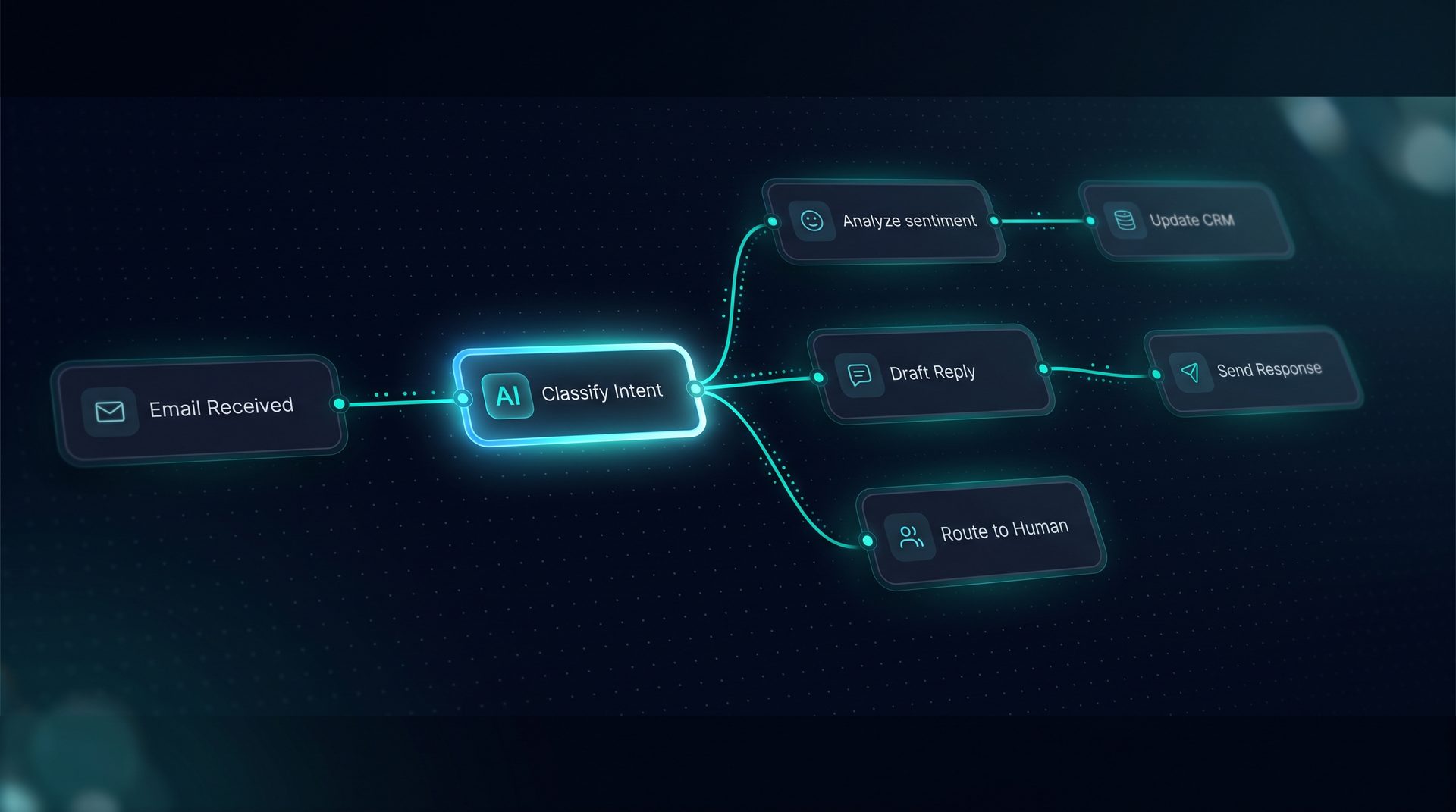
DeepForce visual canvas wiring agents, tools, and knowledge into a live workflow

Automate with human review

This is an ai-generated page and could contain misleading information.Please verify any information first before take any action.

Ai workflow automation is the visual practice of composing models, tools, retrieval, and human steps into repeatable business processes. This guide explains what ai workflow automation is, why it matters for ops teams, and how to build safe, auditable workflows that include human approval points.

What ai workflow automation is

Ai workflow automation combines machine intelligence with process orchestration to handle repetitive tasks like routing approvals, answering common questions, or syncing systems. Instead of hand-coding every integration, teams use a canvas to wire together agents, classifiers, tool calls, transforms, and human-in-the-loop steps. The objective is to reduce manual work while keeping control where it matters with pause nodes and live handoffs.

Why ai workflow automation matters

  • Reduces repeated manual steps for operations and support teams.
  • Keeps governance and audit trails when workflows include human approvals.
  • Lowers dependency on engineering for repeatable automations.

Teams that evaluate ai automation outcomes look for observability, cost tracking, and the ability to test flows before publishing. Good ai workflow automation balances model decisions with deterministic logic like JMESPath projections and webhooks.

How ai workflow automation works — step by step

  1. Define the trigger: webhooks, inbound email, schedule, or API call. Triggers start the workflow and pass validated edges.
  2. Route inputs to agents: attach a Deep Agent to handle language understanding, or send payloads to a classifier to choose a path.
  3. Call tools: register REST, GraphQL, SQL, or custom tools and call them from nodes; use projection to trim payloads before model input.
  4. Insert retrieval and knowledge: add vector stored documents, Q&A pairs, or file ingestion to enrich model responses.
  5. Add human-in-the-loop: place pause nodes for approvals, routing decisions, or corrections and resume over the same channel.
  6. Deploy to channels: expose as a web widget, run API, email channel, or MCP server.

Expert tip: Use a Playground to light up nodes as runs stream; this makes debugging complex routers and parallel fan-out flows faster.

Core building blocks

  • Agents: specialist or supervisor agents with their own models, prompts, and tool grants.
  • Routers and classifiers: typed validated edges ensure payloads follow expected schemas.
  • Loops and fan-out/join: handle batch processing or parallel queries, then rejoin results.
  • Pause nodes: human approval checkpoints that halt until reviewed.
  • Transforms and projections: JMESPath and transform nodes trim and shape data.

Who should use ai workflow automation

  • Operations teams that manage approvals and repetitive email triage.
  • Customer support teams wanting to reduce first-response times while keeping escalation controls.
  • Research and data teams automating routine retrieval and synthesis tasks.
  • Product and IT teams who need embeddable assistants without writing a framework from scratch.

If you need ai for automation but want governance, select a platform that supports project-level PII redaction, blocked terms, and scoped API keys.

When to choose a visual workflow builder over custom code

Choose a visual canvas when non-developers should author, test, and publish workflows in a single session. Visual builders speed up iteration with features like undo/redo, per-node inspectors, minimaps, and a live compiled prompt panel. For developer-heavy integrations, a hybrid approach that exports JSON bundles can bridge teams.

Integrations and tooling considerations

  • Connect REST and GraphQL tools, SQL or code endpoints and test them live.
  • Use environment variables to point tools at staging or production endpoints per environment.
  • Ensure outbound calls are protected with SSRF guards, retries, rate limits, and caching settings.

When evaluating ai for automation, confirm how a platform handles vector stores, embeddings, and search debuggers so you see what retrieval returns and can adjust chunking strategies.

Observability, governance, and safety

Observability matters: look for span trees with latency, token, and cost per step. Audit logs, per-project redaction rules, and quota caps help enforce governance. Pause nodes and explicit human handoffs keep operation teams in control of sensitive outcomes.

Example: building an approval workflow (brief reference)

  1. Trigger: inbound email creates a run.
  2. Classifier: route by intent using a trained classifier node.
  3. Retrieval: attach supporting docs from a vector folder to validate claims.
  4. Agent: generate a proposed decision and render an interactive form component.
  5. Pause node: send to a human reviewer; resume on approval and deploy result via email.

This example shows how ai workflow automation and agent automation combine with human review to automate approvals without sacrificing compliance.

Final considerations

Ai workflow automation, when applied correctly, reduces toil while preserving control. Combining visual builders with tools like JMESPath projection, per-node inspectors, and a robust Playground accelerates safe production deployments. When you evaluate solutions, look for clear governance, human-in-the-loop capabilities, and support for the integrations your team relies on.

Key terms: ai automation, ai for automation, automation and ai, agent automation — all integral to modern process design. Use them as part of requirements when selecting a platform that supports both non-technical authors and developer workflows.


The canvas behind every agent you ship.

Wire it once. Deploy it everywhere.
Introducing DeepForce

Wire it once. Deploy it everywhere.

DeepForce is a visual AI agent builder and automation platform. Compose agents, tools, knowledge, and logic on a drag-and-drop canvas — then publish to an API, MCP server, email inbox, or embeddable web widget without writing framework code. Built on MIT-licensed LangChain and LangGraph, self-hosted on infrastructure you control.

  • Visual drag-and-drop agent and workflow builder
  • Span-level observability with tokens, latency, and cost
  • Deploy to web widget, email, run API, or MCP server
30+
Workflow node types
4
Deployment channels
6
Knowledge file formats
Core capabilities

Everything you need to run autonomous ops.

AI agents that act

AI agents that act

Agents execute multi-step workflows without hand-holding.

Real-time reasoning

Real-time reasoning

See exactly how the AI thinks and decides

Human-in-the-loop

Human-in-the-loop

Approve, override, or audit any decision before it ships.

Other features:
Visual workflow canvas
API integrations
Document ingestion
Audit trail
Role-based access

Common Questions about ai workflow automation

Ai workflow automation handles approvals by including pause nodes and live handoff steps in the visual workflow. A pause node halts execution and creates a human review task in an inbox; the reviewer can examine the run’s span tree, supporting retrieval chunks, and the agent’s compiled prompt before approving or adjusting. Once the human approves, the workflow resumes over the same channel. This pattern preserves audit logs, tokens, and latency per step and keeps governance intact while allowing non-developers to design approval flows.
Yes. Visual builders are designed for non-developers to author ai automation using forms and drag-and-drop canvas components. Users create agents, attach tools, set up classifiers, and configure transforms without writing framework code. The platform exposes a compiled prompt preview and a Playground that lights up nodes during runs, enabling validation and testing in a single session. Developers can still export JSON bundles for complex integrations, so teams get both speed and extensibility.
Triggers supported by ai workflow automation platforms typically include webhooks, inbound email, scheduled jobs, and API calls. These triggers validate incoming payloads and start typed flows along validated edges. Triggers can also be configured to poll app events. Choosing a platform that offers a range of triggers ensures you can connect CRM, ticketing, or custom events to automated workflows with minimal engineering.
Routers and loops let you branch and iterate within an ai workflow automation canvas. Routers use classifiers or rules to send payloads down specific paths. Loops enable repeated processing over items—common for batch approvals or multi-document retrieval—while fan-out/join patterns perform parallel calls and then aggregate results. Typed validated edges help ensure schema compatibility between nodes, reducing run-time errors and making debugging in the Playground more straightforward.
Data privacy in ai workflow automation is managed by project-level PII redaction, blocked terms, and network allow/deny lists. Scoped API keys, role-based access, and audit logs provide governance. Some platforms also offer environment-specific endpoints and secret management so secrets are never exported. These controls let teams enforce compliance while running agents that access knowledge stores and external tools.
Observability typically includes a collapsible span tree for each run showing latency, token usage, and cost per step. Deep tracing, live timelines in the Playground, and exports to OpenTelemetry-compatible collectors let teams analyze performance. Cost tracking per node and nested subagent dispatch visibility help identify expensive steps to optimize. This level of visibility is essential for operationalizing ai automation responsibly.
Workflows can call external APIs and databases by registering REST, GraphQL, SQL, or custom tools. Tools can be grouped, granted in one click, and published as named sets. Features like JMESPath projection trim payloads before model input, and SSRF guards protect outbound calls. Environment variables allow different endpoints per environment, making it safe to test integrations in staging before production deployment.
Teams should choose agent automation when they need language understanding, retrieval, or human-in-the-loop steps alongside deterministic logic. Agents excel at routing, synthesizing documents, and interacting with users. Scripts or traditional automation are better for simple deterministic tasks without language or retrieval needs. Mixing both approaches—visual agents for intent-driven flows and scripts for transactional tasks—often yields the best operational outcomes.

Your Competition Is
Already Using AI.

Every day you wait is another day paying employees to do what AI does better, faster, and cheaper.