Customer support ai that answers from what you actually know
What is customer support ai and why it matters
Customer support ai is an approach that uses retrieval-augmented generation (RAG), knowledge indexing, and workflow logic to answer customer questions from your own documentation and data. Instead of guessing, a support assistant retrieves relevant passages from a knowledge source and composes responses grounded in those documents. For support leaders, this reduces repetitive work, shortens response times, and preserves compliance because replies are tied to source material.
Understanding knowledge base ai, agent orchestration, and human handoffs is critical when building an automation strategy. Modern teams expect tools that can ingest files, web pages, and Q&A pairs and then route uncertain or sensitive cases to a human reviewer.
How customer support ai works (step-by-step)
- Ingest: Upload docs, paste content, crawl sites, or add files like
pdf,md,txt, andcsvinto a vector store. - Index: Chunk and embed content into offline-capable vectors stored in a foldered vector database for fast retrieval.
- Intercept: Configure Q&A pairs to short-circuit frequent questions before retrieval begins, improving accuracy.
- Retrieve: On a user query, the system runs a similarity search to surface the most relevant chunks.
- Compose: A model composes a reply using the retrieved chunks and a system prompt tuned for support tone.
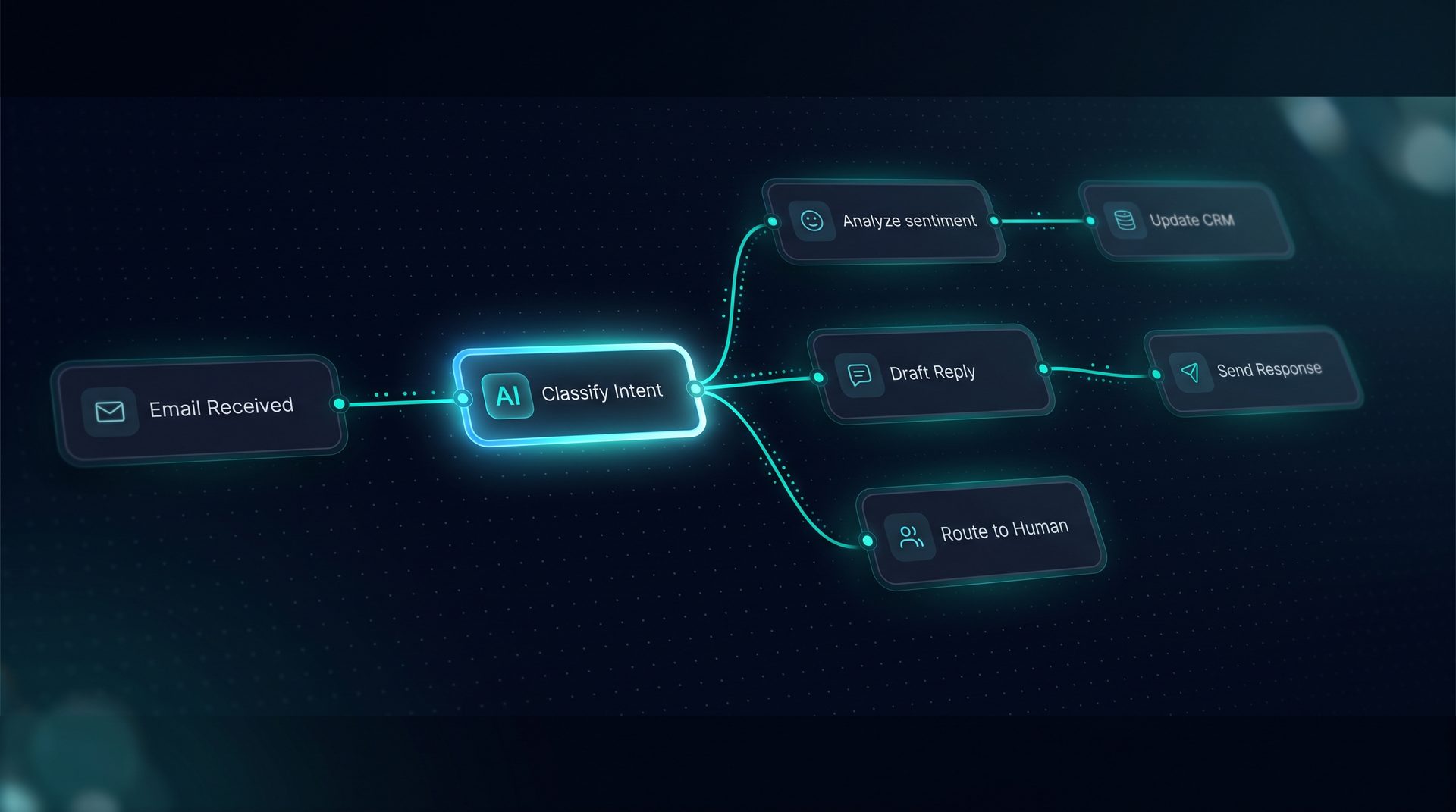
- Triage: Classifiers or rule routers decide whether to send an automated reply, open a ticket, or escalate to a human.
- Handoff: If needed, the workflow pauses for human review and routes the conversation to a human inbox with context.
This flow shows why building an ai assistant requires more than an LLM: you need retrieval, routing, and governance. When you make ai assistant capabilities part of your support stack, you reduce cognitive load and keep responses aligned to documented guidance.
Core components to look for when you build ai assistant
- Knowledge ingestion and chunking for
pdf,html, andtxtfiles. - A vector store with offline capabilities and foldered organization.
- Q&A pair interception to handle high-volume questions quickly.
- Configurable routers, classifiers, and human-in-the-loop nodes.
- Observability: per-run token and latency breakdowns so you can tune cost and performance.
These elements form the backbone of a robust knowledge base ai deployment and are essential whether you're building an ai assistant for support triage or internal help desks.
Who should use customer support ai
- Support managers who want to reduce first response times and scale coverage.
- Documentation teams aiming to make product docs actionable in live conversations.
- Ops and compliance teams that require audit logs and redaction rules.
- Non-technical product managers who need a visual, drag-and-drop way to assemble agents without writing framework code.
If your team handles repetitive questions, routes approvals, or needs human review steps, then building an ai assistant with strong knowledge grounding will reduce manual work while keeping control.
When to deploy customer support ai
Deploy when your support volume includes repeatable patterns, such as billing questions, onboarding steps, or troubleshooting flows. Start with a pilot on a single channel—email or a web widget—and expand once Q&A interception and retrieval return reliable hits. Use triage rules to keep edge cases in human hands.
Expert tip: Begin with a folder of your top 50 support docs and 20 Q&A pairs. Measure retrieval precision and adjust chunking strategy before broad rollout.
Practical example: Using DeepForce to make ai assistant for support
DeepForce demonstrates how to make ai assistant workflows without code. On a visual canvas you register tools, ingest knowledge, author Q&A pairs, and wire classifiers and pause nodes. A live Playground streams runs and shows which chunks the model used, helping you tune prompts and retrieval. Deploy to a web widget or email channel so the same agent answers over chat or routes to an inbox.
This is not a generic automation platform: DeepForce's knowledge and RAG, combined with visual workflow nodes and human-in-the-loop, map directly to the needs of support teams building an ai assistant.
Measuring success and governance
- Track pass rates via evaluations using exact match or LLM judge to ensure answers remain on-message.
- Use per-run observability to monitor token usage and latency and to spot expensive steps.
- Enforce project-level PII redaction, blocked terms, and network allow/deny lists for safe deployment.
When you integrate these controls, the support assistant becomes a reproducible, auditable part of your stack rather than an uncontrolled model.
Summary
Customer support ai built on strong retrieval, Q&A interception, and human handoff reduces repetitive tickets and improves reply quality. Whether you want to build ai assistant capabilities or to upgrade an existing knowledge base ai, focus on ingestion, retrieval accuracy, routing logic, and governance. Use a visual builder to shorten the time from idea to deployed agent, and iterate on the same evidence you use to run support.
Next steps
- Audit your knowledge base to identify high-frequency questions.
- Design Q&A pairs to intercept common support intents.
- Prototype a workflow with triage and a human-in-the-loop pause.
Deploy to one channel, measure pass rate and latency, then scale your support automation with confidence.